
Connect your IP rights.
Manage patents, trademarks, designs and utility models with their status, register link and associated client.
INTELLECTUAL PROPERTY MANAGEMENT
Folixum connects IP portfolios, case files, deadlines and fees. Register imports and optional AI analysis support your team from the first document through ongoing management.
ONE WORKSPACE. CONNECTED INFORMATION.
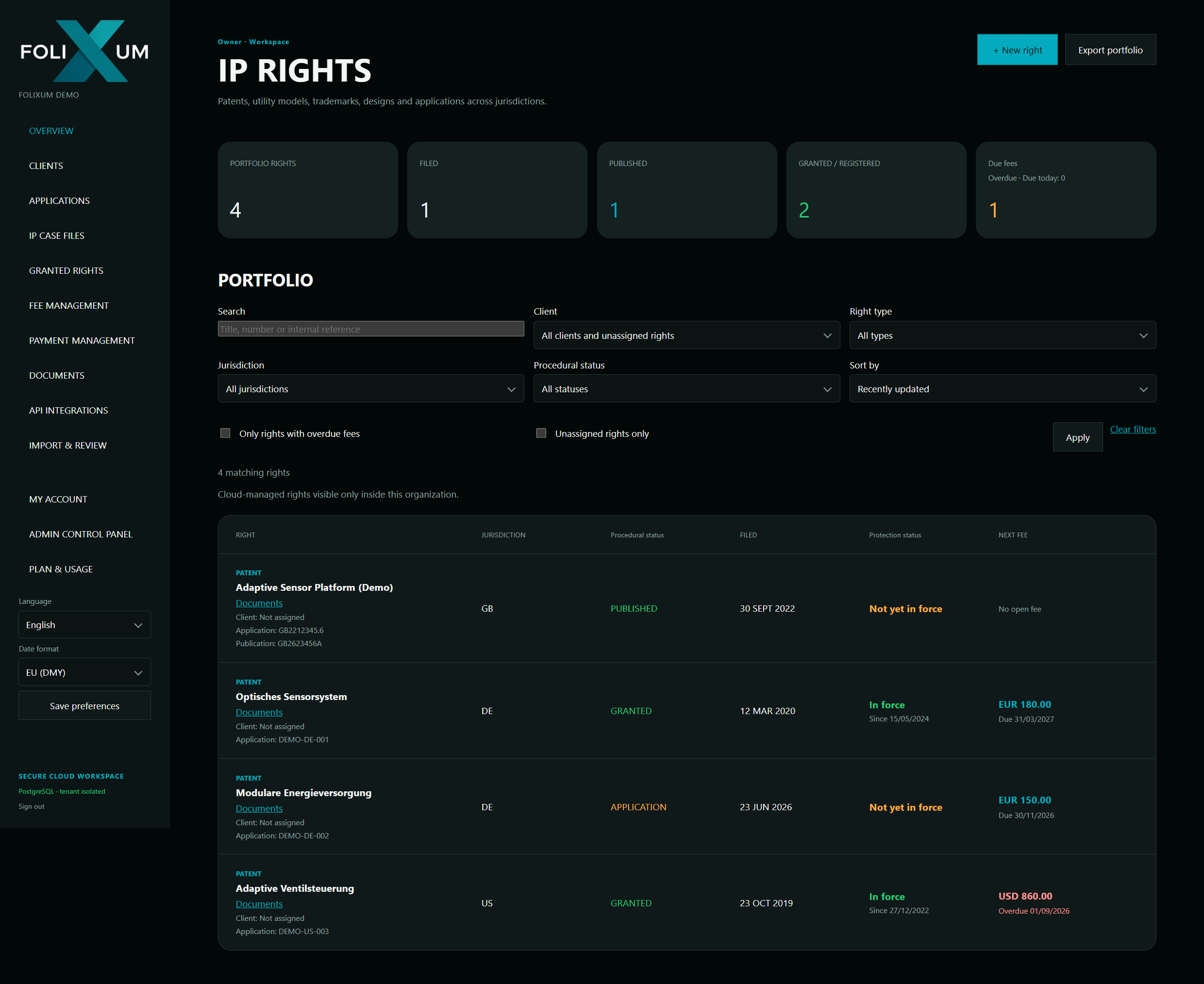
Every detail where it belongs: alongside your IP right.
Manage patents, trademarks, designs and utility models with their status, register link and associated client.
Track due dates, collect payment instructions through individual client links and follow responses through to optional invoicing in Folixum.
Explore payment management →Store documents centrally, link them to IP rights and open them directly from the record.
Individual accounts and clear roles: Admin, Editor and Viewer. The right access for each task.
Review register information and imported data before adding it to your records.
Present selected IP rights as a portfolio on websites.
FEE MANAGEMENT & PAYMENT INSTRUCTIONS
Folixum gives your firm a connected workflow: monitor fees, request client instructions, receive responses in Folixum and optionally send invoices automatically.
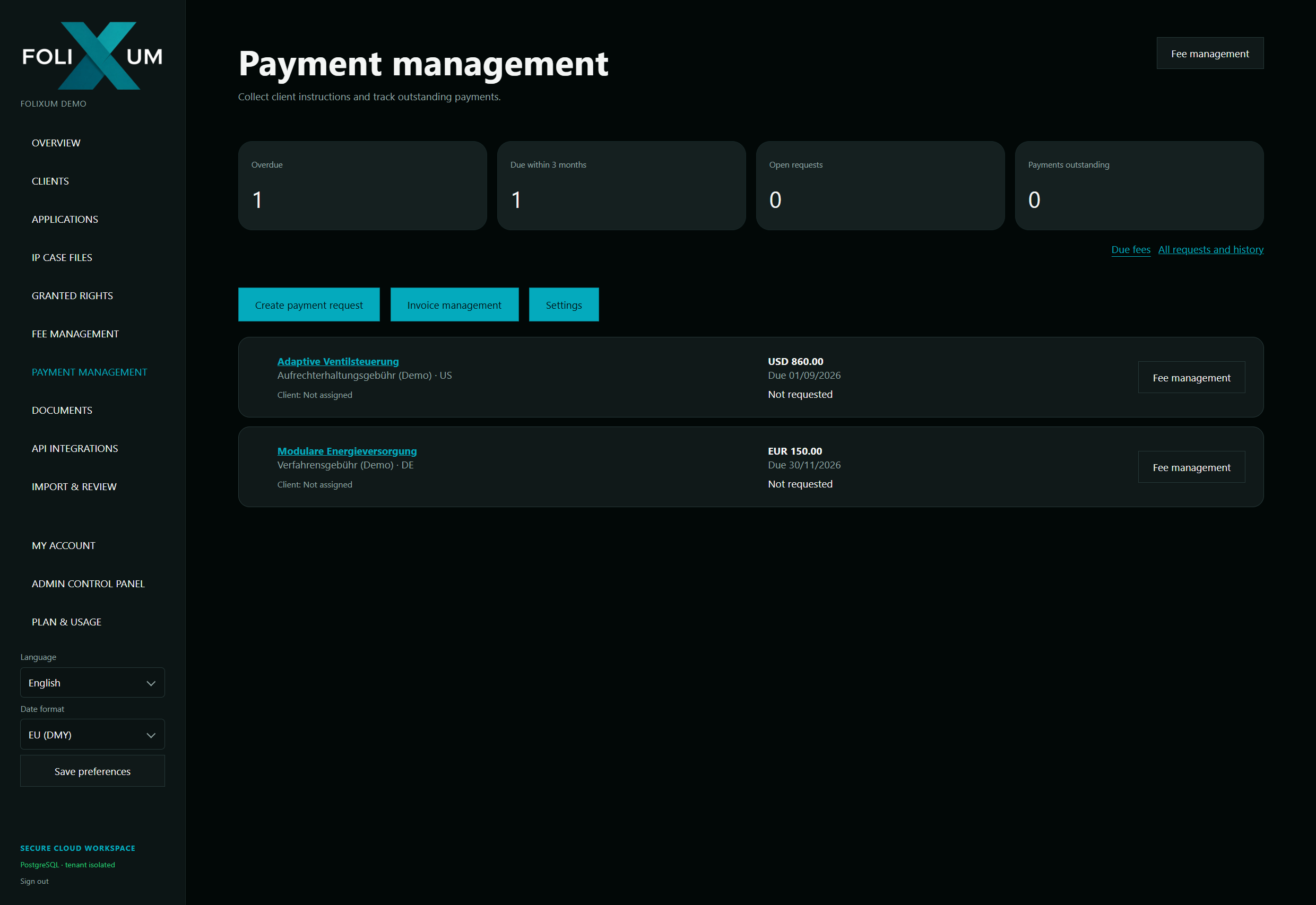
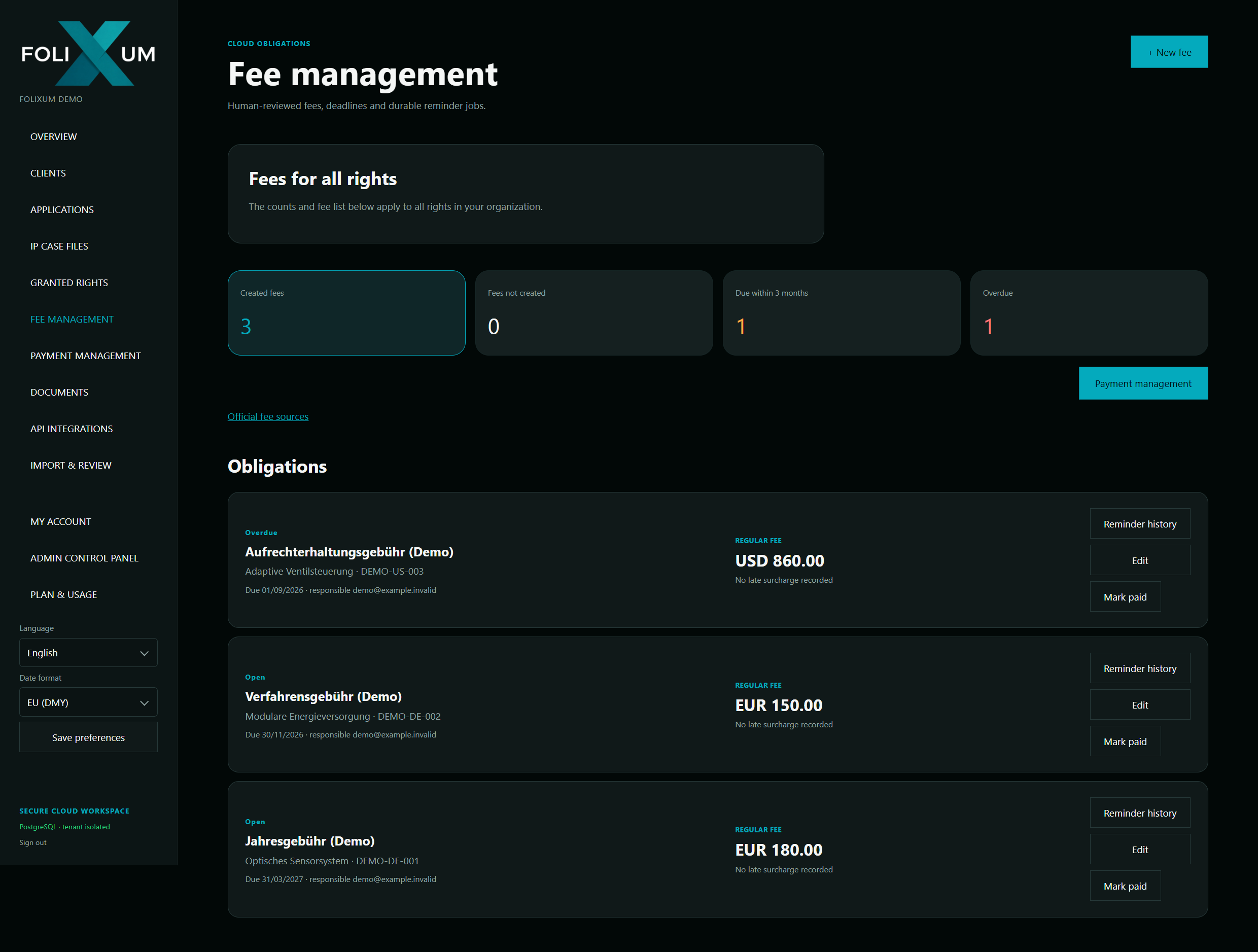
Track overdue and upcoming fees, open requests and outstanding payments. Select the relevant fee and email your client an individual response link.
The link opens a response page for that specific fee or the selected fee items. Your client reviews the IP right, amounts and dates and gives instructions without needing a Folixum account.
Confirmed instructions appear directly in Folixum payment management. The decision, comment and timestamp remain linked to the request, so your team can see which responses are pending and which payments have been commissioned.
When invoice automation is enabled, a confirmed “Pay” instruction triggers Folixum to create and send an invoice in your firm’s name, as a PDF and structured XRechnung XML. Billing details and consent to electronic delivery are collected on the response page.
Available instructions: Pay · Abandon · Handled elsewhere
Instructions, invoices and payments remain distinct: a payment instruction does not confirm receipt of funds or payment to the IP office.
Connect an IP right to its proceedings: office communications, documents, events and response deadlines stay together.
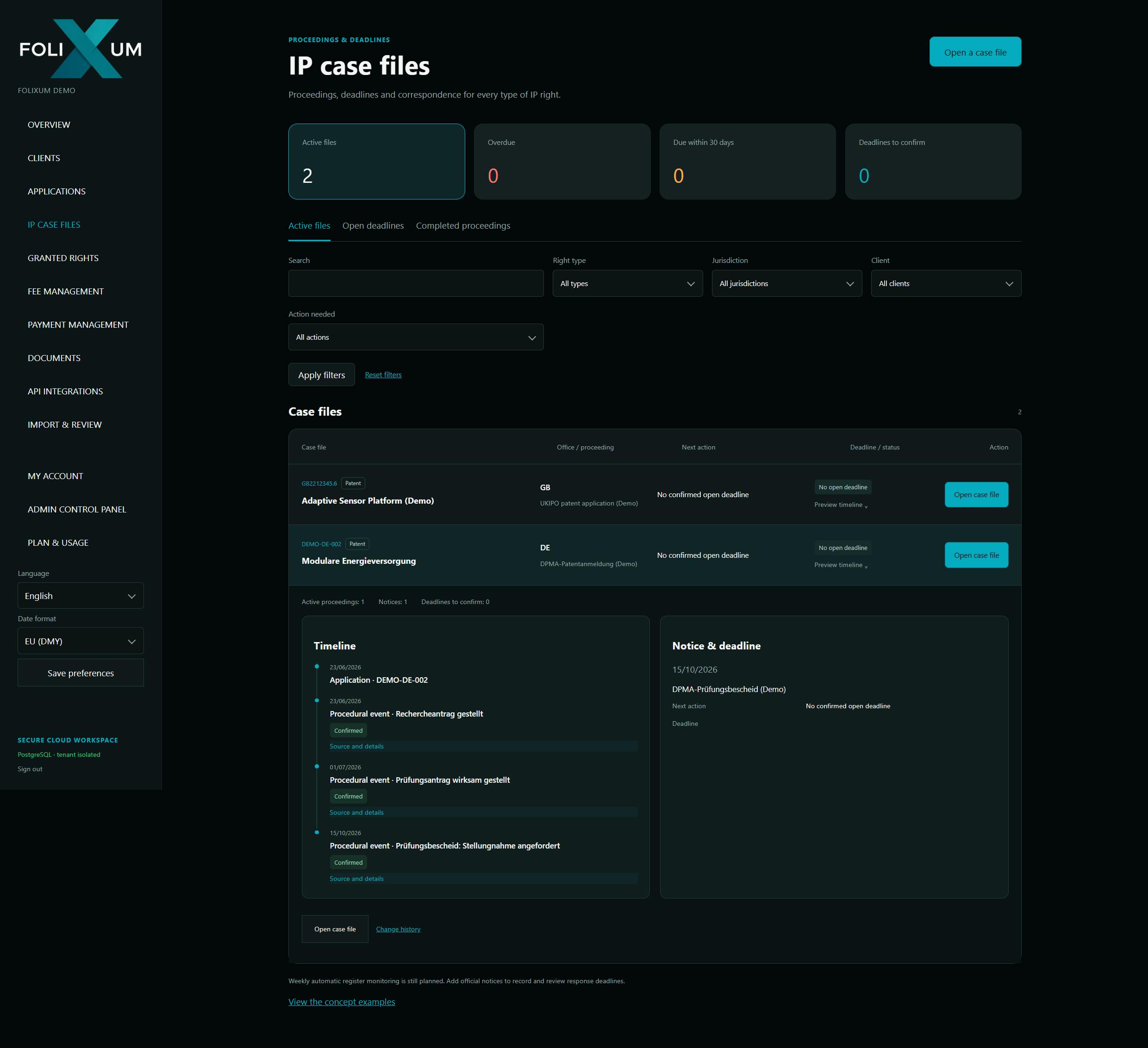
Create case files for new or existing IP rights. Timeline and list views show the history, keeping document dates, delivery dates and deadline start dates distinct.
Split combined scans into individual documents and events. Create separate PDFs where needed while retaining the original, page references and version history.
Review AI suggestions with source references and targeted questions. Supported procedures use the verified start date and office calendar for calculation. A draft becomes a confirmed deadline only after your explicit approval.
Changes remain traceable. Missing delivery dates prompt questions, and corrections preserve the original record. Your team remains responsible for professional review.
Extract information from PDF, PNG and JPEG documents or prepare spreadsheet imports. AI suggests the data; you decide what Folixum saves.
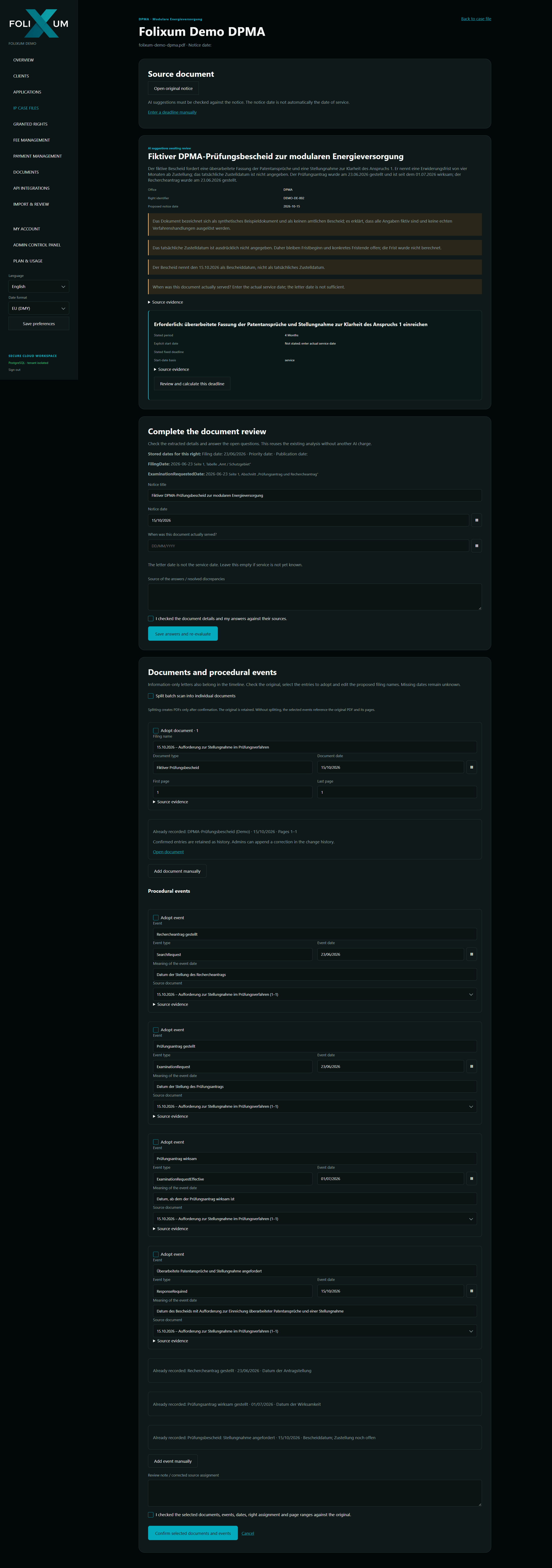
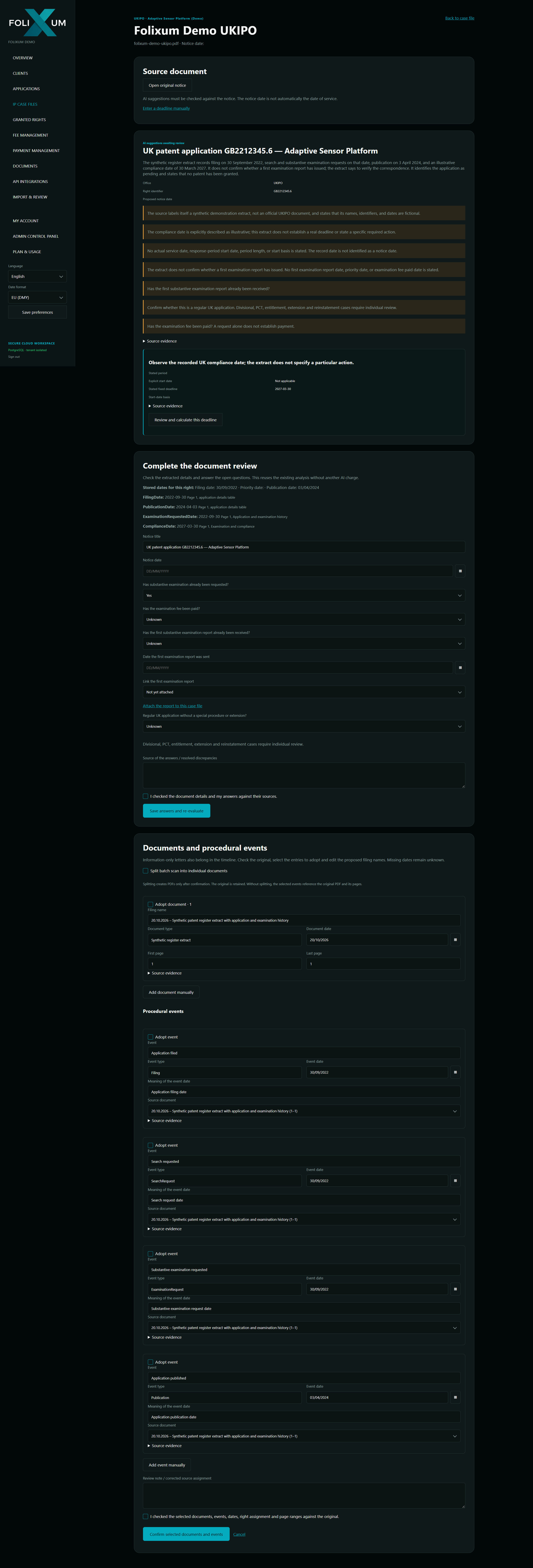
AI provides suggestions – you decide what to import. The demo deadlines shown are not legally binding results.
AI helps identify IP data, documents and procedural events. Source references support comparison with the original.
Missing information stays visible. Add details such as delivery dates and re-evaluate your answers without starting another chargeable AI call.
Prepare CSV and Excel files with manual or optional AI-assisted column mapping. Resolve ambiguous dates and unclear columns before importing.
AI analysis is optional. Folixum uses your plan’s monthly AI allowance first. Any usage beyond that allowance draws on purchased AI credits. You authorise the selected content before it is sent to the AI provider. Check suggestions and source references against the original.
API INTEGRATIONS
Folixum supports register imports through EUIPO, DPMA, USPTO, INPI and EPO. Retrieve data from an available source, review the import and confirm what is added to your portfolio.
Availability and data coverage depend on the API, access permissions and the provider’s approval. Depending on the source, access is provided through Folixum or configured with your own credentials.
Data coverage varies by integration and IP type. INPI supports French patents, trademarks and individual designs; French parts of European patents remain associated with the French register. UKIPO documents can be processed through document import — this is not a direct UKIPO API integration.
FROM LOOKUP TO RECORD
Select an office and enter the application or registration number.
Check the retrieved data and add your client and internal reference.
Save the reviewed record to your Folixum portfolio.
FOR THE PEOPLE BEHIND IP PORTFOLIOS
For IP practices
Client-specific records, central documents and defined access rights support everyday collaboration.
For businesses
See your portfolio, upcoming fees and related documents in one place.
Calculate fees for supported offices and IP types and optionally add them during import. Review fee periods, reductions and existing payments; configure reminders separately.
Export your entire portfolio or filter by client, jurisdiction and IP type as CSV or Excel. Excel can also include fees, response deadlines and calculation details.
Individual accounts, defined roles and organisation profiles support collaboration. The software interface is available in German, English and French.
PLANS & PRICING
From your first IP rights to an extensive portfolio: choose the plan that fits your needs.
Monthly prices in USD, excluding applicable taxes.
| Plan | IP rights | Storage | Monthly price | AI analyses per month |
|---|---|---|---|---|
| Starter | Up to 10 | 1 GB | FreeFree | None included |
| Portfolio 50 | Up to 50 | 10 GB | US$25£19 | approx. 235 |
| Portfolio 100 | Up to 100 | 25 GB | US$39£30 | approx. 588 |
| Practice 200 | Up to 200 | 50 GB | US$59£45 | approx. 1,176 |
| Practice 500 | Up to 500 | 100 GB | US$115£85 | approx. 3,529 |
| Practice 1,000 | Up to 1,000 | 200 GB | US$209£159 | approx. 10,588 |
| Individual | By agreement | As required | On requestOn request | By agreement |
The monthly AI allowance depends on your plan. The free Starter plan has no included allowance. You can see your remaining allowance in the import and review area. View the fictional UKIPO reference document (PDF). Provisional estimates based on comparable analyses. Actual usage depends on the document.
STARTER · FREE
No time-limited free trial needed: simply register and discover how Folixum makes managing your IP rights easier.
The Starter plan lets you manage up to 10 IP rights free of charge — ideal for trying Folixum or managing a small portfolio. You can upgrade your existing plan at any time as your needs grow.
GOOD TO KNOW
Not to submit payment instructions. Your client receives an individual email link to the response page for the requested fees. Their response is linked directly to your request in Folixum.
Register imports are retrieved and reviewed on request. Scheduled automatic register synchronisation is still planned and is not currently presented as an available feature.
Patents, trademarks, designs and utility models – with their documents, fees and dates.
Yes. Team members receive individual accounts. The Admin, Editor and Viewer roles define what each person can edit.
Register directly in Folixum and start for free with up to 10 IP rights. You can upgrade your plan at any time as your portfolio grows.
GET TO KNOW FOLIXUM
Start for free with up to 10 IP rights and discover Folixum in your everyday work.
Start for freeAlready have an account? Sign in →